

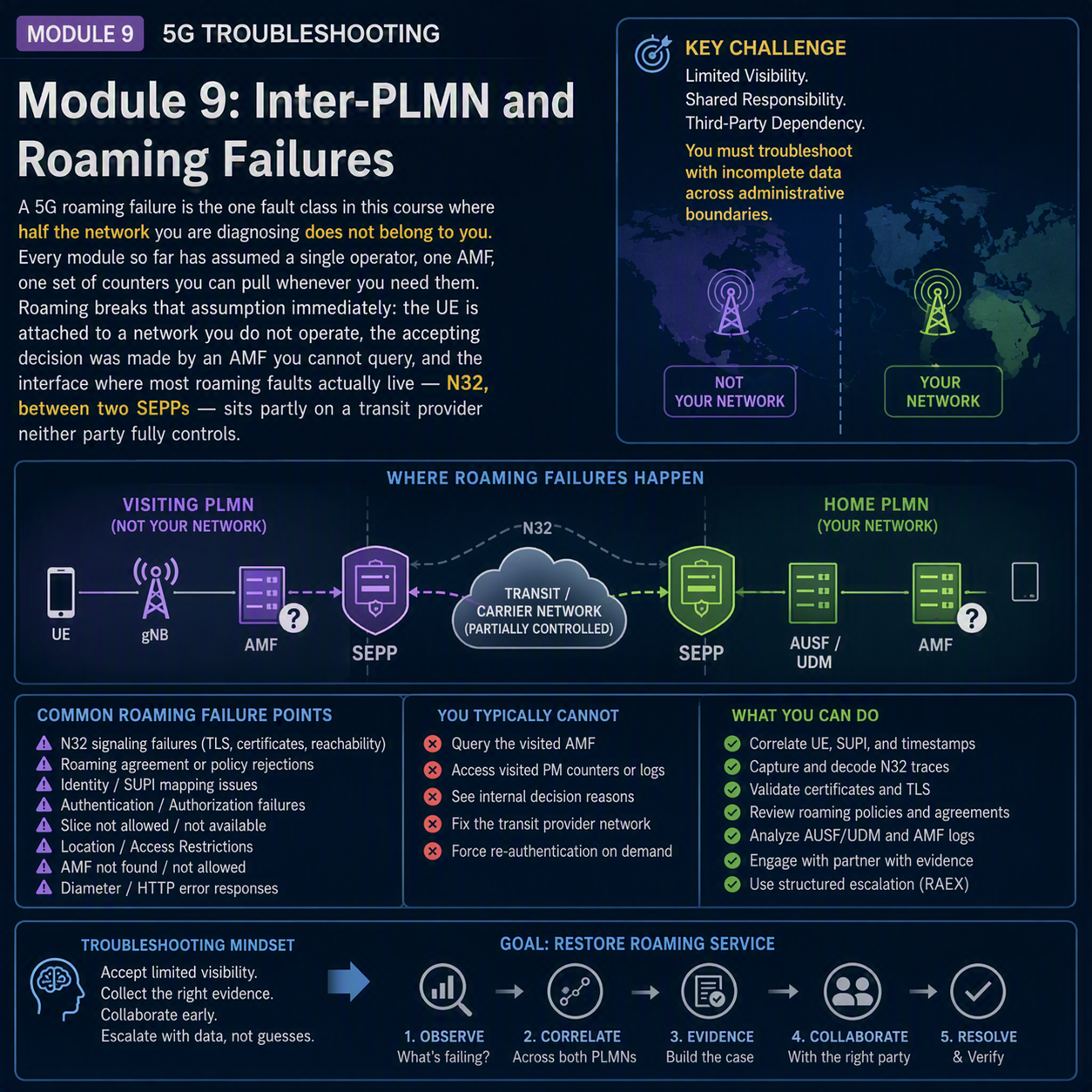
A 5G roaming failure is the one fault class in this course where half the network you are diagnosing does not belong to you. Every module so far has assumed a single operator, one AMF, one set of counters you can pull whenever you need them. Roaming breaks that assumption immediately: the UE is attached to a network you do not operate, the accepting decision was made by an AMF you cannot query, and the interface where most roaming faults actually live — N32, between two SEPPs — sits partly on a transit provider neither party fully controls.
That changes the job. The method from Module 1 still applies — classify, establish scope, eliminate layer by layer — but the layers now include an organizational boundary as well as a technical one. This module covers what you can diagnose from your own side, what you have to request from a roaming partner or IPX carrier, and the four places a roaming session actually fails.
Every roaming fault sits on one of three hops. Name the hop before you touch anything.
In this module
- Part 1 — Roaming architecture: SEPP, N32 and the hops that can fail
- Part 2 — The N32 handshake, step by step
- Part 3 — What you can see, and what you have to ask for
- Part 4 — 5G roaming failure: the registration reject causes
- Part 5 — S-NSSAI not supported: when the slice does not travel
- Part 6 — Home-routed vs. local breakout: the session that took the wrong path
- Part 7 — Steering of roaming, and why it looks like a fault
- Part 8 — Voice and messaging over roaming
- Part 9 — Counters, and the ones you don’t own
- Part 10 — 5G roaming failure worked example
- Part 11 — The full decision tree
Part 1 — Roaming architecture: SEPP, N32 and the hops that can fail
Every 5G roaming session crosses the same three-part structure: the home network (HPLMN), the visited network (VPLMN), and the security proxies — SEPPs — that mediate everything passing between them. A UE roaming abroad registers on the VPLMN, but its subscription, authentication vectors and (in home-routed mode) its user-plane anchor all live on the HPLMN.
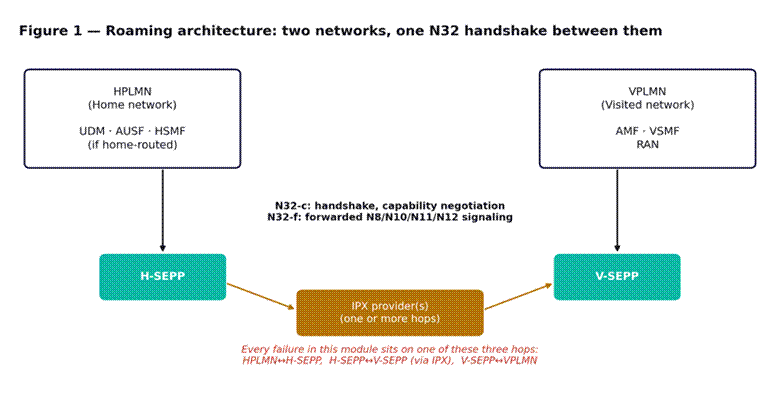
Figure 1 — Roaming architecture. Every fault in this module sits on one of three hops: HPLMN↔H-SEPP, H-SEPP↔V-SEPP via IPX, or V-SEPP↔VPLMN.
The Security Edge Protection Proxy is the node that makes inter-operator signaling possible at all. Every message that needs to cross from one operator’s core to another’s — authentication requests, session management, mobility signaling — is routed through the sending operator’s SEPP, across N32 to the receiving operator’s SEPP, and only then into that operator’s own network functions. Neither operator’s internal NFs ever talk to the other operator’s NFs directly.
N32 itself splits into two logical interfaces. N32-c handles the initial handshake and capability negotiation between the two SEPPs — this happens once, when the relationship between two operators is established, not per session. N32-f is the forwarding interface that carries every actual signaling message afterward, wrapped for the security mode the two SEPPs agreed on during the N32-c handshake.
Between the two SEPPs sits at least one IPX provider — often several, chained together, since HPLMN and VPLMN rarely have a direct interconnect. Each IPX hop is a place a message can be delayed, dropped or (rarely) modified in a way that breaks the security context. This is the segment neither operator fully controls, and it is disproportionately the source of intermittent, hard-to-reproduce roaming complaints.
Part 2 — The N32 handshake, step by step
Nothing else in this module works if the N32-c handshake has not completed. It is worth understanding in full, because a handshake that partially succeeds — agreeing capabilities but failing to establish the application-layer security context — produces a specific and confusing failure signature: the two SEPPs can reach each other, but every subsequent forwarded message is rejected.
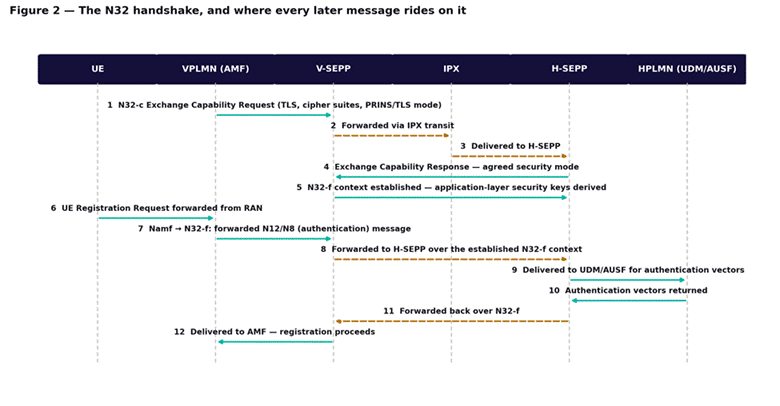
Figure 2 — The N32 handshake. Steps 1 to 5 happen once per operator relationship; steps 6 onward repeat for every roaming registration.
| Step | What happens | What it tells you when it fails |
| 1–3 | Exchange Capability Request negotiates the security mode: TLS, or PRINS for cases needing selective modification en route | A request that never reaches the far SEPP is an IPX transit fault, not a SEPP fault |
| 4 | Exchange Capability Response confirms the agreed mode | A mismatch here — one SEPP insisting on PRINS, the other only supporting TLS — fails the whole relationship |
| 5 | N32-f security context is established; application-layer keys are derived | This is the step that silently fails most often — capabilities agree, but the context never forms |
| 6–7 | UE registers on the VPLMN; the AMF needs to reach the HPLMN for authentication | Nothing to do with N32 yet — this is an ordinary domestic registration on the VPLMN side |
| 8 | V-SEPP forwards the authentication message to H-SEPP over N32-f | If step 5 failed, this forwarding is rejected here, and the UE sees a generic failure with no useful cause |
| 9–10 | H-SEPP delivers to UDM/AUSF; authentication vectors are generated and returned | A failure here is an HPLMN-side fault, not a roaming interface fault |
| 11–12 | Vectors are forwarded back through the established N32-f context to the AMF | Registration proceeds exactly as it would domestically from this point on |
The practical implication: if a roaming partner’s subscribers cannot register at all, check step 5 before anything else. Capability negotiation succeeding while context establishment fails is a known interoperability pattern, usually surfacing after one side changes a certificate, a cipher suite policy or a SEPP software version without coordinating the change with roaming partners.
Part 3 — What you can see, and what you have to ask for
This is the part of roaming troubleshooting that has no equivalent anywhere else in the course. Your own logs answer some questions completely and others not at all, and knowing which is which before you start saves days.
| Question | Answered from your own side | Requires the partner or IPX |
| Did the N32-c handshake complete with this partner | Yes — your SEPP logs the result | — |
| Was a specific UE’s registration forwarded | Yes, if you are the VPLMN — your V-SEPP logs it | If you are the HPLMN, you need the VPLMN’s registration record |
| Why did the VPLMN reject the UE | No — the reject originates in their AMF | Yes — request the specific 5GMM cause and timestamp |
| Where in the IPX chain a message was delayed or dropped | Partially — your own SEPP shows send and (non-)receive | Yes, for hop-by-hop timing — IPX provider trace |
| Whether the visited network supports a given S-NSSAI | Sometimes — via roaming agreement documentation | Yes, for a live discrepancy — VPLMN NSSAI configuration |
The practical workflow: exhaust what your own SEPP and AMF logs can tell you first, narrow the failure to one of the four categories below, and only then raise a query to the partner or IPX provider — with the specific timestamp, IMSI (or SUCI) and cause value already in hand. A query that says “roaming isn’t working with Partner X” gets a slow, generic answer. A query that says “registration rejected with cause #62 at 14:32 UTC for this SUPI, S-NSSAI 1-101020” gets a fast, specific one.
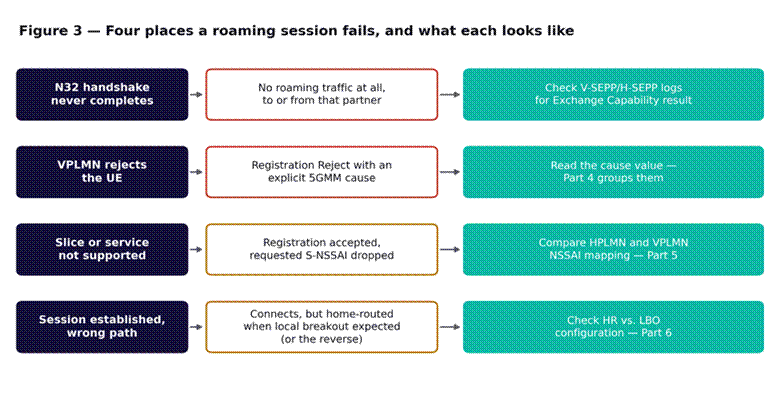
Figure 3 — The four places a roaming session fails. Parts 4 through 6 work through each row in order.
Part 4 — 5G roaming failure: the registration reject causes
Module 2 covers the 5GMM cause table for domestic registration. Several of those causes carry a different, roaming-specific meaning, and a handful only ever appear in a roaming context.
| Cause | In a domestic context | In a roaming context |
| #11 / #12 | PLMN or tracking area forbidden for this subscriber | No roaming agreement exists for this PLMN pair — check the roaming agreement, not the RAN |
| #15 | No suitable cells in this tracking area | Roaming not allowed in this tracking area under the current agreement’s geographic scope |
| #62 | No network slices available | S-NSSAI not supported by this VPLMN — go to Part 5 |
| #72–#76 | 5GS/EPS services not allowed variants | Roaming restricted to a subset of services under the agreement; the UE requested one outside it |
The distinguishing test is simple: if the same cause value appears for the same subscriber on their home network, it is a domestic fault and Module 2 applies. If it appears only when that subscriber roams onto a specific partner, the fault is in the roaming relationship — the agreement, the SEPP configuration, or the VPLMN’s own capability — not in anything on your side to fix unilaterally.
Part 5 — S-NSSAI not supported: when the slice does not travel
Network slicing does not automatically roam. A UE subscribed to a specific S-NSSAI on its home network has no guarantee the visited network offers an equivalent slice, or maps it the same way. This is cause #62 in a roaming context, and it is one of the more common roaming complaints as slicing sees more commercial use — an enterprise IoT fleet with a dedicated home slice can lose that treatment entirely the moment a device roams, without losing basic connectivity.
Two distinct things can go wrong, and they look identical from the UE’s side:
- The VPLMN genuinely does not offer the slice. Roaming agreements specify which S-NSSAIs are supported between two operators, and a slice available domestically may simply not be part of the agreement. This is a commercial and configuration question, not a fault to chase technically.
- The VPLMN offers an equivalent slice under a different S-NSSAI, and the mapping is missing or wrong. The HPLMN and VPLMN each have their own S-NSSAI namespace, and roaming requires an explicit mapping between them. A missing or stale mapping produces the same rejection as a genuinely unsupported slice, even though the visited network could serve the traffic.
Triage: before treating this as “the partner doesn’t support our slicing,” check whether a mapping exists at all for that S-NSSAI pair. This is frequently the actual fault — the underlying service is supported, but nothing tells the VPLMN which of its own slices your S-NSSAI corresponds to. The network slicing primer covers the S-NSSAI structure this mapping operates on, and the underlying core functions coordinating it are covered in AMF, SMF and UPF.
Part 6 — Home-routed vs. local breakout: the session that took the wrong path
A session can register successfully, establish a PDU session successfully, and still be wrong — because it took a path the deployment did not intend. This is the fault class Figure 3 labels as phase 4: nothing rejected, and the problem is invisible until someone notices the traffic went somewhere unexpected.
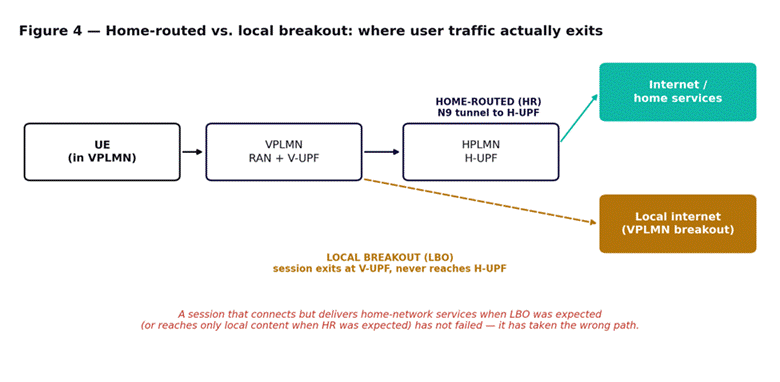
Figure 4 — Home-routed vs. local breakout. Both are valid session types; the fault is a session using the wrong one for its deployment.
Home-routed (HR) anchors the user plane at the HPLMN’s UPF: traffic exits an N9 tunnel from the VPLMN back to the home network before reaching the internet or home services. This is the default for most roaming agreements, because it lets the home operator retain full charging and policy control, and it is what most enterprise roaming deployments expect for consistent access to home-hosted services.
Local breakout (LBO) exits at the VPLMN’s own UPF, never reaching the HPLMN at all. It gives lower latency to local internet destinations and reduces the load on inter-operator transport, but the HPLMN loses direct visibility into that session’s traffic, and any home-hosted enterprise service is unreachable through it.
The fault, in practice: an enterprise expecting home-routed sessions for consistent access to a private HPLMN-hosted service finds that some roaming sessions are silently using local breakout instead, and the service is unreachable for those users — while basic internet access works fine, so nothing looks broken from the user’s side. The reverse also occurs: a deployment expecting local breakout for latency-sensitive traffic finds sessions being home-routed instead, adding round-trip latency through the HPLMN for no functional reason.
Triage: confirm which mode the SMF selected for the affected sessions — this is visible in your own session records if you are the HPLMN for home-routed sessions, or in the SMF selection logic if you are diagnosing your own subscribers roaming out. The selection is governed by the roaming agreement and by DNN/S-NSSAI-specific configuration on both sides; a session taking the wrong path is almost always a configuration mismatch between the agreed mode and what one side’s SMF is actually applying.
Part 7 — Steering of roaming, and why it looks like a fault
Steering of roaming lets an HPLMN influence which VPLMN a UE selects when multiple options are available in the same location — commonly used to direct traffic toward a preferred roaming partner for cost or quality reasons. It operates by updating the UE’s preferred PLMN list over the air, typically via the UDM.
The failure signature is specific: a UE that should be roaming on Partner A instead attaches to Partner B, or repeatedly re-selects between the two. This is not a registration failure on either network — both accept the UE — and it is not a coverage problem. It is steering of roaming either not being applied, being applied with a stale preference list, or conflicting with the UE’s own PLMN selection logic.
Triage: before investigating either VPLMN, confirm whether steering of roaming is configured for this subscriber and whether the preference update was successfully delivered. A UE that never received the updated list will fall back to its default selection behavior, which frequently does not match what steering was trying to achieve — and this looks, from a distance, exactly like the roaming partner’s network being at fault.
Part 8 — Voice and messaging over roaming
Voice and SMS over a roaming 5G session add a layer beyond the PDU session mechanics covered so far. Where the home network delivers voice via IMS, roaming voice typically depends on the visited network correctly supporting either a roaming-specific IMS interconnect or a fallback to circuit-switched or LTE voice — and each hop from Part 1 can independently break it even when the underlying data session is healthy.
The most common pattern: data roaming works normally, but voice calls fail or fall back unexpectedly. This points at the IMS/voice-specific roaming path rather than at the general N32/PDU session mechanics already covered — check whether the VPLMN supports the same voice roaming mode (VoLTE roaming via S8HR, or local breakout for IMS) that the HPLMN expects, since a mismatch here fails calls while leaving data completely unaffected.
Part 9 — Counters, and the ones you don’t own
Roaming counters split cleanly into what you can measure unilaterally and what requires a shared or requested view.
| Measurement point | Who can see it | What it isolates |
| N32-c handshake success/failure per partner | Both SEPPs, independently | Whether the relationship itself is healthy |
| N32-f forwarding success/failure | Both SEPPs, independently, for their own direction | Which hop a specific message failed at |
| Registration attempts and rejects, by roaming partner | VPLMN directly; HPLMN only via VPLMN records | Whether a specific partner relationship is degrading |
| S-NSSAI rejection rate, by partner | VPLMN directly for its own rejections | Slice mapping gaps, once compared against the agreement |
| HR vs. LBO session split, by partner and DNN | Whichever side anchors the session | Whether the configured mode is being applied consistently |
The single most useful practice here is not a counter at all: keep a log of N32-c handshake status per active roaming partner, checked on a fixed schedule rather than only when a complaint arrives. A silently failed handshake with a low-volume partner can go unnoticed for weeks, because the symptom — that partner’s subscribers cannot roam onto your network — never reaches anyone who would think to check the interconnect.
Part 10 — 5G roaming failure worked example
An enterprise customer reports that fleet devices roaming into a neighboring GCC country intermittently lose access to a private HPLMN-hosted telemetry service, while general internet access continues to work. The pattern is inconsistent: some devices are affected, others on the same fleet, in the same location, are not.
Establishing scope. All affected devices share one property: they registered during a specific two-hour window three days earlier, coinciding with a maintenance change at the roaming partner. Devices that registered before or after that window are unaffected.
Checking the session path. For the affected devices, session records show local breakout is being used. For unaffected devices, home-routed is being used, which was the intended mode for this DNN under the roaming agreement — home-routed carries the telemetry service traffic back to the HPLMN; local breakout cannot reach it at all.
Reading the timing. The maintenance change at the roaming partner updated their SMF’s DNN-to-session-mode mapping. The update was applied correctly going forward, but sessions already active at the moment of the change retained their prior mode rather than being renegotiated, and — critically — the update itself briefly reverted the default for new sessions during a two-hour rollout window before the correct mapping took effect fleet-wide.
The fix. Devices caught in the two-hour window registered with local breakout under the reverted default and will keep that session mode until their next PDU session re-establishment. No further devices are affected going forward. The fix for the already-affected devices is a forced session re-establishment rather than a network-side change, since the network-side fault is already resolved.
What made it findable: checking session mode directly rather than treating this as a connectivity problem. Every accessibility and reachability check the customer had already run showed the network working, because from the network’s perspective it was — the sessions were simply anchored in a way that made one specific destination unreachable.
Part 11 — The full decision tree
Step 1 — Confirm the interface is healthy
- Check N32-c handshake status for the specific roaming partner involved. If it has failed, nothing downstream will work regardless of any other configuration.
- If the handshake succeeded, check whether the failure is per-subscriber, per-service, or affects all traffic with that partner.
Step 2 — Classify by symptom
- No registration at all with a specific partner: go to Step 1 and confirm the handshake.
- Registration rejected with a cause value: go to Part 4 and read the cause in its roaming context, not its domestic one.
- Registration succeeds but a specific slice or service is missing: go to Part 5.
- Session connects but reaches the wrong destination or the wrong latency profile: go to Part 6.
- UE attaches to an unexpected partner network: go to Part 7.
- Voice or SMS fails while data works: go to Part 8.
Step 3 — Gather what you can before contacting the partner
- Pull every log entry your own side can produce: SEPP handshake status, forwarding logs, session mode, timestamps.
- Confirm whether the same subscriber has the same problem on any other roaming partner, or only this one — that alone tells you whether the fault is subscriber-side or partner-specific.
Step 4 — Escalate with specifics, not symptoms
- Send the partner or IPX provider the exact timestamp, subscriber identifier, cause value and hop where your own logs show the failure.
- Ask a specific question the answer to which changes what you do next — not a general status check.
Step 5 — Confirm the fix against the original complaint
- Re-test with the same subscriber and the same service, not just a generic connectivity check.
- Check whether sessions already active when the fault occurred need to be re-established manually, as in the worked example, rather than assuming a network-side fix reaches them automatically.
What comes next
Module 10 turns to a different kind of boundary: RedCap devices, which deliberately trade capability for cost and battery life, and the failures that occur when a network is not configured to recognize that trade-off. If you need the registration and cause-code baseline this module builds on, it is covered in Module 2, and the slicing structure behind Part 5 in network slicing.