

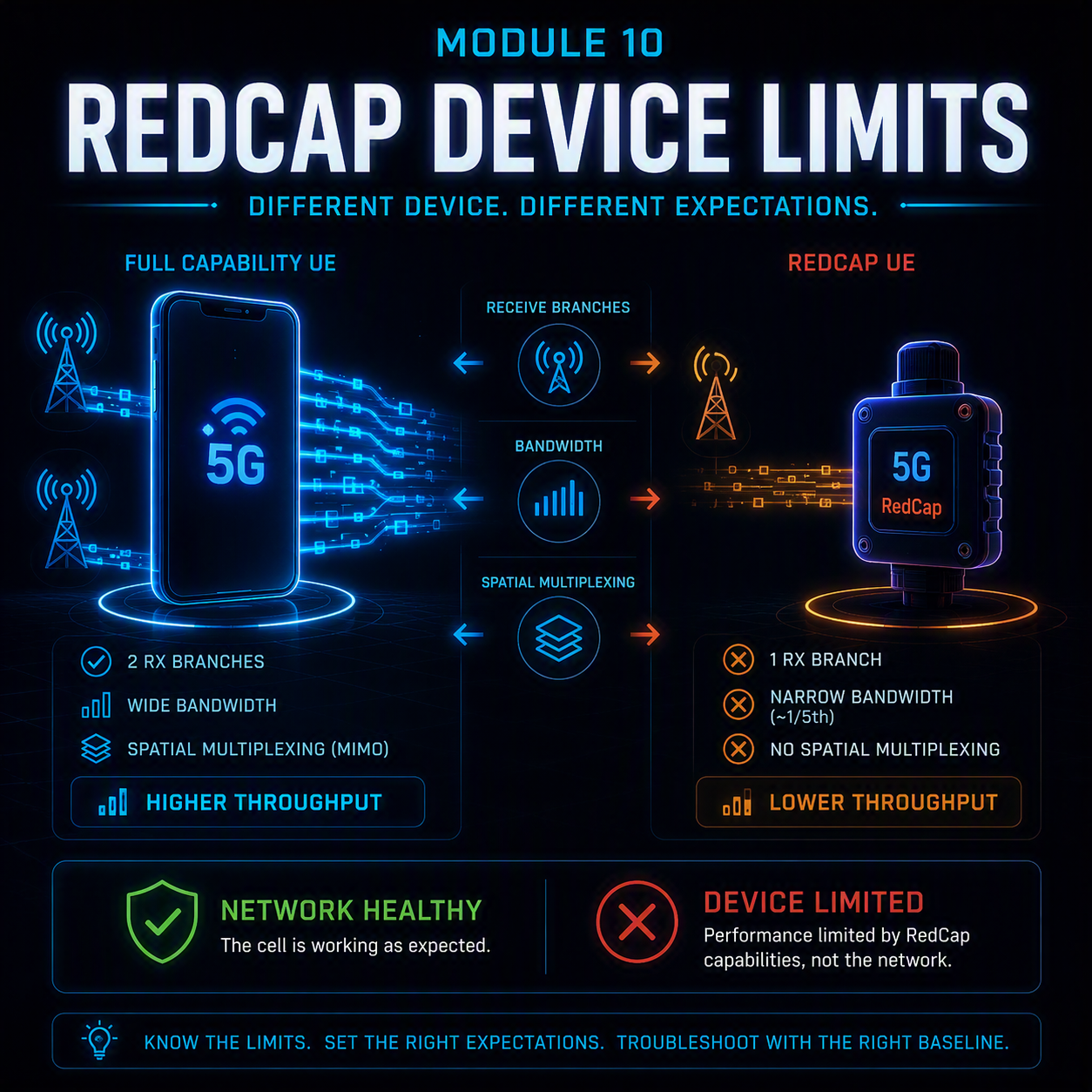
5G RedCap troubleshooting breaks a habit every other module in this course relies on: comparing the failing device against a working one on the same cell. With RedCap that comparison is misleading by design. A reduced-capability device has one receive branch where a normal handset has two, a fifth of the bandwidth, and no spatial multiplexing at all — so it will fail in places a full-capability UE works perfectly, and nothing is wrong with the network.
That makes the central question of this module different from every previous one. It is not “what broke?” but “is this a fault, or is this the device doing exactly what it was specified to do in a deployment that did not plan for it?” Getting that wrong in either direction is expensive: chasing a configuration fault that does not exist, or dismissing a real one as an inherent limitation.
A RedCap device failing where a handset succeeds is not evidence of a fault. It is the starting point of the investigation, not the conclusion.
In this module
- Part 1 — What RedCap actually gives up
- Part 2 — Early identification: MSG1, MSG3 and why it matters
- Part 3 — SIB1, barring and the separate initial BWP
- Part 4 — 5G RedCap troubleshooting: the symptom router
- Part 5 — The coverage gap, and why it is not a fault
- Part 6 — Half-duplex FDD and the scheduling trap
- Part 7 — Admission control and slice selection
- Part 8 — Capability handling and reconfiguration failures
- Part 9 — Counters, and why device-class splitting is mandatory
- Part 10 — Worked example
- Part 11 — The full 5G RedCap troubleshooting decision tree
Part 1 — What RedCap actually gives up
RedCap exists to serve devices that need 5G connectivity but cannot justify a handset’s cost, power draw or complexity — industrial sensors, wearables, video surveillance, asset trackers. The specification achieves that by removing capability in five specific places, and each removal produces a distinct class of field behavior.
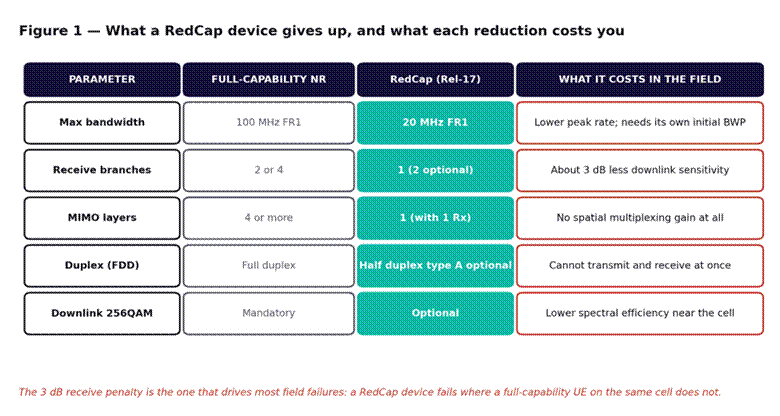
Figure 1 — What a RedCap device gives up. The receive-branch reduction is the one that causes most field surprises.
The bandwidth reduction to 20 MHz in FR1 is the one that shapes network configuration most, because a RedCap device physically cannot tune to a wider initial bandwidth part. If the cell’s initial BWP exceeds 20 MHz and no separate RedCap initial BWP is configured, RedCap devices cannot complete initial access at all — covered in Part 3.
The single receive branch is the one that shapes field behavior most. Losing a receive antenna costs roughly 3 dB of downlink sensitivity, which translates directly into a smaller usable cell radius for RedCap than for everything else on the same cell. Part 5 covers what that means operationally.
One note on releases: everything in this module is Rel-17 RedCap unless stated. Rel-18 introduces eRedCap, which reduces baseband bandwidth further — to around 5 MHz — and widens every gap described here. If a deployment mixes both, split them in analysis; they are not the same device class.
Part 2 — Early identification: MSG1, MSG3 and why it matters
The network has to know a device is RedCap before it finishes configuring it, otherwise it will allocate resources the device cannot use. The specification provides two points at which this can happen, and which one a network uses changes the failure signature.
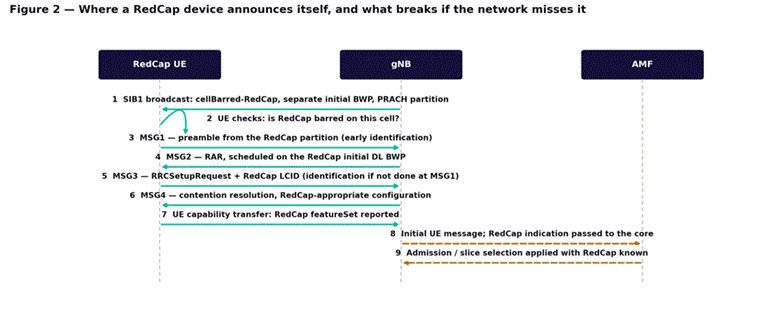
Figure 2 — Where a RedCap device announces itself. Identification at MSG1 is earlier and safer; identification at MSG3 leaves two messages exposed.
| Identification point | How it works | What goes wrong |
| MSG1 (early) | A separate PRACH preamble partition, or separate initial UL BWP, reserved for RedCap | If the partition is not configured, the network cannot distinguish RedCap until MSG3 |
| MSG3 | A RedCap indication carried in the MSG3 logical channel identity | MSG2 and MSG3 were already scheduled without RedCap knowledge — they can exceed device capability |
| Capability transfer | Full RedCap featureSet reported after RRC setup | Too late to prevent an access failure; useful only for subsequent configuration |
Why MSG1 identification matters more than it first appears: without it, the random access response at MSG2 is scheduled as though for a full-capability device. A RedCap device that cannot receive that allocation fails the procedure, and the failure appears as an ordinary random access problem with no indication that device class was the cause. The general access procedure this builds on is covered in NR initial access — cell search, SSB and random access, and the preamble partitioning it depends on in RACH preamble planning.
Part 3 — SIB1, barring and the separate initial BWP
Three SIB1 parameters decide whether a RedCap device can use a cell at all, and misconfiguration in any of them produces the same symptom: the device never camps, while every handset on the same cell works normally.
- cellBarred-RedCap. The network can explicitly bar RedCap devices from a cell, separately for 1 Rx and 2 Rx variants. This is a legitimate deployment choice — a congested macro cell may exclude RedCap deliberately — but when it is set unintentionally, or left from a trial configuration, the result is a device that treats the cell as barred and moves on. It generates no failure at the network, because nothing was ever attempted.
- Separate initial downlink and uplink BWP. If the cell’s initial BWP is wider than 20 MHz, RedCap needs its own narrower one. Without it, the device cannot receive system information or the random access response.
- halfDuplexRedCapAllowed. Governs whether half-duplex FDD RedCap devices are permitted. Covered in Part 6.
Triage rule: if RedCap devices fail to camp on a cell where handsets work, read SIB1 before doing anything else. All three of these faults are invisible from the network side — there is no rejection, no counter, and no trace, because a barred or unusable cell is one the device never attempts.
A device that never attempts access leaves no evidence at the network. Read what the cell is broadcasting, not what it recorded.
Part 4 — 5G RedCap troubleshooting: the symptom router
Six symptoms account for most RedCap tickets. Three are configuration faults to fix; three are the device behaving as specified in a deployment that did not account for it.
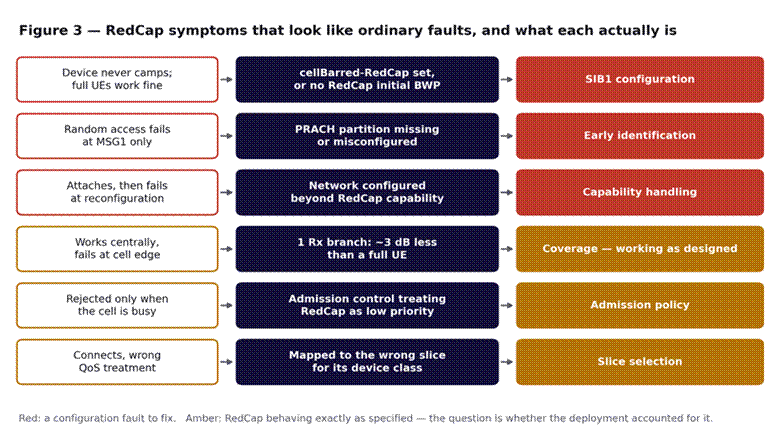
Figure 3 — RedCap symptoms and what each actually is. The red rows are faults; the amber rows are design consequences.
The distinction in that figure is the most useful thing in this module. The red rows have a fix: a parameter is wrong and correcting it resolves the problem. The amber rows do not — the network is behaving correctly and the device is behaving correctly, and the resolution is a deployment or commercial decision about whether RedCap is suitable for that location, that cell load, or that service.
Confusing the two wastes the most time. A team that treats the cell-edge coverage gap as a fault will tune radio parameters indefinitely without result, because there is nothing to fix.
Part 5 — The coverage gap, and why it is not a fault
A device with one receive branch collects roughly half the energy of one with two. That is about 3 dB, and 3 dB of downlink sensitivity translates directly into a smaller usable radius.
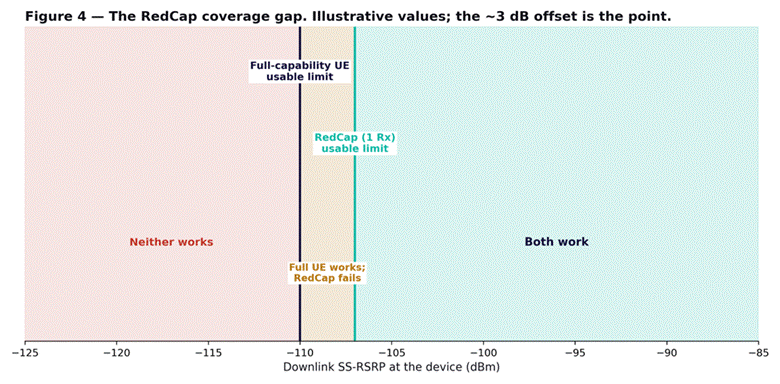
Figure 4 — The RedCap coverage gap. Between the two lines, full-capability devices work and RedCap devices do not.
Everything in the amber band of Figure 4 is a location where a handset connects and a RedCap sensor does not. No counter will flag this, because from the cell’s perspective the RedCap device simply never completed access — indistinguishable from a device out of coverage.
The specification provides coverage recovery mechanisms to narrow the gap: repetition of MSG3 during random access, PUSCH repetition, and lower coding rates for RedCap transmissions. These genuinely help and are worth enabling before concluding a site needs densification. They do not eliminate the gap — they reduce it.
The practical consequence for deployment planning: a RedCap IoT fleet cannot be planned against handset coverage maps. If devices are being installed at fixed locations — meters, sensors, cameras — the ones near the cell edge on a handset-derived map are the ones that will fail, and they will fail permanently rather than intermittently, because a fixed device does not move back into coverage. The link-budget reasoning behind the asymmetry is covered in massive MIMO and beamforming.
Part 6 — Half-duplex FDD and the scheduling trap
A half-duplex FDD RedCap device cannot transmit and receive at the same time, unlike every handset the scheduler was designed around. The network must know this and schedule accordingly, which is what halfDuplexRedCapAllowed and the capability report exist to communicate.
When it goes wrong, the signature is distinctive: intermittent failures that correlate with traffic rather than with radio conditions. A device with excellent RSRP fails during busy periods and works when the cell is quiet, because the scheduler is issuing overlapping uplink and downlink grants the device cannot honor — it will simply miss one of them.
Triage: correlate failures against cell load rather than against signal quality. A RedCap failure profile that tracks PRB utilization and ignores RSRP points at scheduling, not coverage — the opposite conclusion from Part 5, reached from the same symptom.
Part 7 — Admission control and slice selection
Two core-side decisions can reject or misroute RedCap devices while the radio works perfectly.
Admission control
Networks can prioritize device classes under congestion, and RedCap traffic — typically low-rate, delay-tolerant telemetry — is a natural candidate for lower priority. That is a reasonable policy, but it produces a failure profile that looks like a radio problem: devices connect fine off-peak and are rejected during busy hours, at the same location with the same signal.
Triage: plot RedCap admission rejections against cell load. A clean correlation is admission policy, not radio, and the decision is commercial — whether the telemetry service tolerates being deprioritized.
Slice selection
RedCap devices are frequently intended for a specific slice — an IoT or enterprise telemetry slice with its own QoS treatment. If device class is not carried into slice selection correctly, devices land on a default slice and receive the wrong treatment: they connect, they pass traffic, and the service level is not what was sold. The S-NSSAI mechanics are covered in network slicing and the QoS consequences in QoS and 5QI.
This is a class D fault in the scheme from Module 1 — works, but wrong treatment — and like all class D faults it is invisible unless someone checks the treatment rather than the connectivity.
Part 8 — Capability handling and reconfiguration failures
A device that completes initial access and then fails at reconfiguration has almost always been given a configuration outside its capability. The mechanism is the same as the EN-DC capability faults in Module 8: the network configured something the device cannot apply, and the device rejected the reconfiguration rather than the radio failing.
The RedCap-specific cases are bandwidth beyond 20 MHz, more than one MIMO layer to a 1 Rx device, 256QAM to a device that did not report it, and full-duplex assumptions against a half-duplex device.
The diagnostic that settles it: split reconfiguration failures by device model. RedCap implementations vary in which optional features they support, and a fault concentrated on one model with others unaffected is a capability mismatch rather than a network fault — the same split-by-model logic that resolves EN-DC capability faults.
Part 9 — Counters, and why device-class splitting is mandatory
Every counter in this course has assumed a broadly homogeneous device population. RedCap breaks that assumption, and a blended counter actively hides RedCap faults: a cell with 500 handsets and 20 sensors will show healthy access success even if every sensor is failing.
| Measurement point | What it isolates | Read it against |
| Random access success, split by RedCap and non-RedCap | Whether the failure is device-class-specific | Each other — the gap is the RedCap-specific loss |
| RRC setup success by device class | Access faults after the preamble | Random access success on the same split |
| Admission rejections by device class | Admission policy effects | Cell PRB utilization — correlation means policy |
| Reconfiguration failures by device model | Capability mismatches | Other models on the same cell |
| Devices camped by class, per cell | Barring and BWP faults | Expected device inventory for that site |
The last row is the one most often missing and most often decisive. A fixed RedCap fleet has a known inventory — you know how many sensors are installed on each site. A cell serving fewer than expected has devices that never camped, and Part 3 explains why that leaves no other trace.
Counter names differ by vendor while the measurement points do not. 3GPP TS 28.552 defines where each one increments, and RedCap-specific splits are relatively new — confirm they exist in your software baseline before designing a report around them.
Part 10 — Worked example
An enterprise deploys around 400 RedCap sensors across a large industrial site for environmental telemetry. At commissioning, 340 report normally and roughly 60 never appear at all. The integrator reports the devices as faulty; the RAN team finds no failures in any access counter for the site.
Establishing scope. The 60 missing devices are not randomly distributed. Plotted on the site map, they cluster at the perimeter — the furthest points from the two cells serving the area. Every device within roughly two-thirds of the cell radius works; the failures are all beyond it.
Why the counters showed nothing. The devices never completed random access, so from the cell’s perspective they were never there. The site’s overall access success rate — dominated by several hundred working devices and the handsets of staff on site — showed no degradation at all.
Ruling out configuration. SIB1 is checked first, per Part 3: RedCap is not barred, and a separate 20 MHz initial BWP is correctly configured. MSG1 early identification via PRACH partition is enabled. So the three red rows of Figure 3 are eliminated, and this is not a configuration fault.
Confirming the mechanism. Handset measurements taken at the failing perimeter locations show RSRP comfortably within usable range for a full-capability device — which is why the coverage map, built from handset drive testing, showed the whole site as covered. The RedCap devices at those same points are roughly 3 dB short of what they need.
The resolution. Two actions. First, enable the coverage recovery mechanisms — MSG3 repetition and PUSCH repetition for RedCap — which recovers around 25 of the 60 devices. Second, the remaining 35 sit far enough out that no parameter change reaches them, and they require either relocation of the sensors or an additional small cell at the perimeter.
What made it findable: treating the absence of devices as the evidence. Nothing failed, no counter moved, and the fault was identifiable only by comparing the number of devices actually camped against the number known to be installed.
Part 11 — The full 5G RedCap troubleshooting decision tree
Step 1 — Establish whether the device is present at all
- Compare devices camped against known installed inventory, per cell. Missing devices leave no other trace.
- If devices are missing entirely, read SIB1 before anything else: cellBarred-RedCap, separate initial BWP, halfDuplexRedCapAllowed.
- If SIB1 is correct, the failure is coverage or early identification — continue to Step 2.
Step 2 — Split every counter by device class
- Random access and RRC setup success, RedCap against non-RedCap, on the same cell. A gap is device-class-specific.
- If non-RedCap is healthy and RedCap is not, the network is working and the question is which RedCap-specific mechanism is failing.
Step 3 — Separate faults from design consequences
- Failures that correlate with distance or path loss: the coverage gap in Part 5. Enable coverage recovery, then assess whether the site plan is viable.
- Failures that correlate with cell load and ignore signal quality: admission policy (Part 7) or half-duplex scheduling (Part 6).
- Failures at MSG1 only: early identification (Part 2).
- Failures after successful attach, at reconfiguration: capability handling (Part 8) — split by device model.
- No failure, but wrong service treatment: slice selection (Part 7).
Step 4 — Exhaust the recoverable before concluding it is physical
- Enable MSG3 and PUSCH repetition for RedCap, and confirm the coding rate configuration, before recommending densification.
- Re-measure device count camped, not just access success — recovered devices appear as new arrivals.
Step 5 — Judge against the deployment, not the cell
- Confirm against the installed inventory, since a fixed fleet’s success criterion is that every device reports, not that the success rate is high.
- Where devices remain unreachable, state plainly whether the remedy is network-side or deployment-side. A sensor beyond RedCap range is a siting decision, not a RAN fault.
What comes next
Module 11 returns to dual connectivity, extending Module 8 beyond EN-DC to the NR-DC and NE-DC configurations, where both legs can be NR and the master node is no longer necessarily LTE. The complete index is on the 5G Troubleshooting Guide, and the architecture this course assumes is covered in the 14-module Introduction to 5G course.