

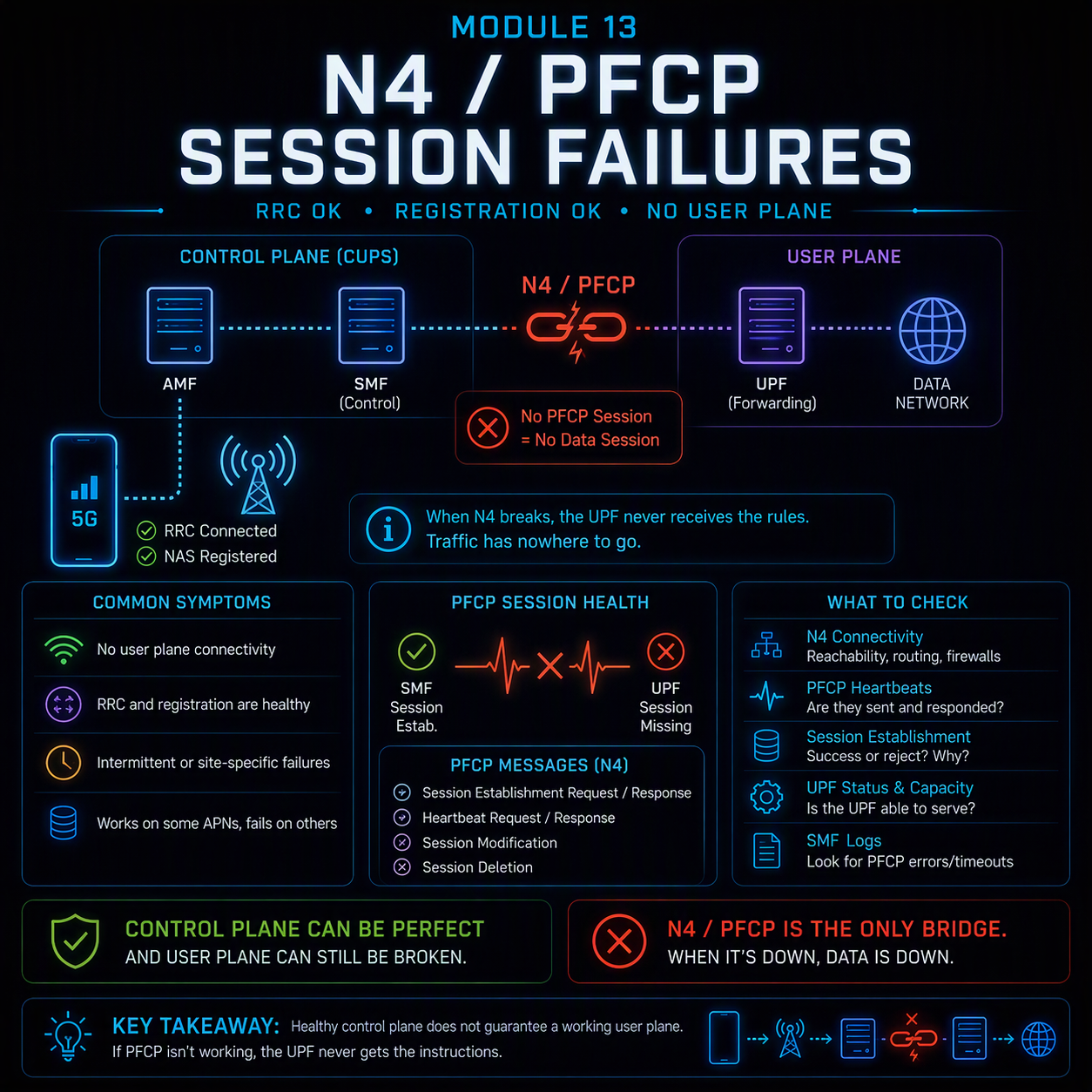
An N4 PFCP session failure is the fault class this course has been building toward without naming directly: every prior module assumed that once RRC connects and NAS registration succeeds, a working user plane follows automatically. It doesn’t. CUPS split the 5G core’s control and user planes into separate functions — SMF for control, UPF for the actual packet forwarding — and N4, running the PFCP protocol, is the only thing that connects them. When N4 breaks, RRC is healthy, NAS registration succeeds, and the subscriber still has no working data session, because nothing ever told the UPF what to actually do with the traffic.
This is a fault class with almost no visibility from the radio or NAS layer. A UE can show “registered,” a PDU Session Establishment Accept can be sent, and the actual user plane can simply not exist — because the SMF’s instructions to the UPF over N4 were rejected, timed out, or silently failed to apply.
Registration succeeding tells you the control plane agreed to build a session. It doesn’t tell you the user plane was actually built.
Where N4/PFCP sits, and what it actually does
N4 is the interface between SMF and UPF, and PFCP (Packet Forwarding Control Protocol, defined in 3GPP TS 29.244) is what runs over it. The SMF doesn’t move any packets itself — its entire job is telling one or more UPFs what rules to apply, and PFCP is the language that instruction is written in.
| PFCP message | Direction | What it does |
| Association Setup Request/Response | SMF ↔ UPF | Establishes the SMF-UPF relationship itself, exchanged once when a UPF comes online — nothing else on N4 works until this succeeds |
| Session Establishment Request/Response | SMF → UPF | Installs the actual forwarding rules for one PDU session: Packet Detection Rules (PDR), Forwarding Action Rules (FAR), QoS Enforcement Rules (QER) |
| Session Modification Request/Response | SMF → UPF | Updates an existing session’s rules — a QoS change, a new tunnel endpoint after handover, a policy update |
| Session Report Request/Response | UPF → SMF | The UPF reports something back — usage data for charging, or a detected event like the first downlink packet arriving for a session that was set to buffer |
| Heartbeat Request/Response | Either direction | Periodic liveness check between SMF and UPF — the mechanism that catches a UPF that’s gone silent without a clean disconnect |
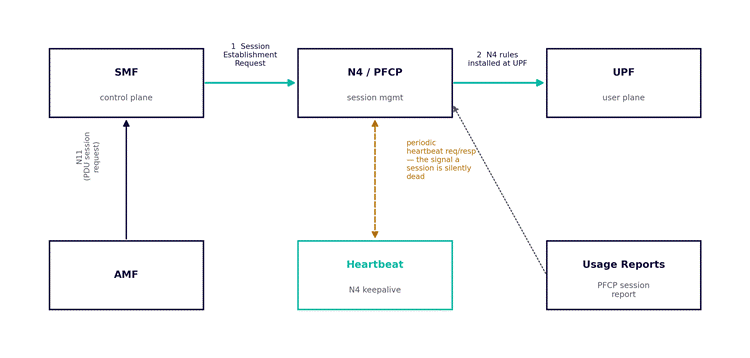
Figure 1. The N4/PFCP relationship between SMF and UPF — session establishment, ongoing heartbeat, and usage reporting.
The three rule types, and what happens when one is wrong
A PFCP Session Establishment Request doesn’t just say “create a session” — it installs three specific rule types at the UPF, and a fault in any one of them produces a different, specific symptom.
| Rule type | What it defines | Symptom when misconfigured or missing |
| PDR (Packet Detection Rule) | How the UPF identifies which packets belong to this session — matching on tunnel endpoint, QFI, or other criteria | Traffic silently dropped: the UPF has no rule to recognize the packets as belonging to any session, so they’re discarded with no NAS or RRC-visible error |
| FAR (Forwarding Action Rule) | What the UPF does with matched packets — forward to a specific N6 interface, buffer, drop, or duplicate for lawful intercept | Session establishes, radio is healthy, but data goes nowhere — traffic is matched (PDR works) but has no valid forwarding instruction |
| QER (QoS Enforcement Rule) | Rate limiting and QoS marking applied to matched traffic — covered in Module 6 from the QoS-flow side | Traffic flows but at the wrong priority or throughput ceiling — the session works, but not as specified |
The diagnostic implication: a PDR fault and a FAR fault look identical from outside the core — both present as “no data despite a healthy-looking session”. Only a PFCP-level trace at the SMF or UPF distinguishes them, which is why this fault class routinely gets escalated past radio and transport teams with no resolution — neither has visibility into N4 at all.
N4 heartbeat loss: the silent-death pattern
The PFCP heartbeat mechanism exists specifically because a UPF can fail in a way that leaves existing sessions stale without any clean teardown signal. If a UPF restarts, loses its association state, or becomes unreachable without the SMF being told, every session that UPF was handling continues to exist in the SMF’s own records — registered, apparently active — while producing zero actual user-plane traffic.
Heartbeat failure detection has a built-in lag: the SMF only notices a dead UPF after missing the configured number of heartbeat responses, typically tens of seconds. Every session on that UPF is dead for that entire window with no proactive signal — the subscriber simply experiences “no internet” with a phone that still shows full signal and “registered.”
A restarted UPF is worse than a slow one. If a UPF restarts and loses its PFCP association entirely, it forgets every session it was told to build — the SMF has to detect the broken association (via a failed heartbeat or a Node Report indicating restart) and re-establish every affected session from scratch. Until that recovery completes, every subscriber on that UPF has a registered, apparently healthy session carrying no traffic at all.
Worked example
A cluster of enterprise IoT devices on a dedicated network slice reports intermittent total data loss — sessions appear to register normally, but no data passes for several minutes at a time, recurring roughly every few hours, then recovering on their own.
- Classify and scope. NAS registration always succeeds; RRC never shows a failure. This immediately rules out every fault class covered in Modules 2 through 12 — nothing radio or NAS-visible is actually failing.
- Check session state at the SMF. Sessions show as established for the affected devices throughout the outage windows — the SMF believes everything is fine.
- Check the UPF handling this slice’s traffic. The UPF serving this slice shows periodic restarts, correlating exactly with the outage windows — caused by an unrelated memory-management issue on that specific UPF instance under high load.
- Check heartbeat timing. Each restart takes roughly 90 seconds to be detected via missed heartbeats, plus additional time for the SMF to rebuild every affected PFCP session from scratch — accounting for the multi-minute outage windows observed.
- Fix and re-measure. The UPF’s own stability issue is a separate infrastructure fix; the N4-specific mitigation is tightening the heartbeat interval so failure is detected faster, and confirming the SMF’s session-rebuild logic actually re-establishes affected sessions promptly rather than waiting for the next subscriber-triggered signal.
Nothing in this fault would have been visible from Module 2‘s registration analysis or any RRC-layer trace — the entire fault lived in the SMF-UPF relationship, invisible from both the radio side and the subscriber’s own NAS signaling.
Elimination order for a suspected N4/PFCP fault
- Confirm NAS registration and PDU Session Establishment both report success — if either failed, this isn’t an N4 fault, it’s Module 2 territory.
- Check whether the symptom is total data loss (points at PDR/FAR) or a QoS/throughput issue with data still flowing (points at QER, overlapping with Module 6).
- Check the PFCP association status between the specific SMF and UPF instances handling the affected sessions — not just “is the UPF up” generally.
- If the association is healthy, trace the actual Session Establishment/Modification messages for the affected session and check for rejected or incomplete rule installation.
- If sessions are established but intermittently dead, check heartbeat interval configuration and UPF restart/stability history — a silent UPF failure is the most common root cause of this specific symptom shape.
What comes next
Module 14 moves to the AMF: NAS congestion control and overload — what happens when the AMF itself becomes the bottleneck, and how it deliberately rejects otherwise-healthy registration attempts to protect itself.